Leave Your Message

7 Tips for Choosing the Best Office Paper for Your Business

Choosing the right Office Paper can affect printing quality, employee productivity, and long-term purchasing costs. A cheap ream may curl in a laser printer, show ink through thin sheets, or jam during a large report. I have made that mistake before. The label looked economical, but the wasted pages told a different story.

Industry data supports a closer review. The American Forest & Paper Association reported a 60.8% paper recovery rate in the United States in 2023. That figure makes recycled content and responsible disposal practical purchasing considerations, not decorative claims. The U.S. Environmental Protection Agency also identifies paper and paperboard as a major part of municipal solid waste. Your choice matters beyond the supply cabinet. It leaves a visible trail.

Jonathan Tame, a senior spokesperson for Two Sides, has said, “Paper is a renewable, recyclable, and biodegradable material.” That statement needs context. Paper is not automatically sustainable; fiber sourcing, production, transport, and recycling access all matter. The following seven tips examine those details without pretending one grade fits every office. They cover weight, brightness, opacity, surface finish, recycled content, printer compatibility, and total cost per usable page. Check the manufacturer’s technical sheet. Test a sample first. Five minutes can prevent a month of frustration. A perfect choice may not exist, but a defensible one does.
7 Tips for Choosing the Best Office Paper for Your Business

Start with ISO 216: A4 Paper Measures 210 × 297 mm

7 Tips for Choosing the Best Office Paper for Your Business

Start with ISO 216: A4 Paper Measures 210 × 297 mm

Tip 1: Check the paper size before judging its quality. ISO 216 defines A4 paper as 210 × 297 mm. This standard fits most office printers, folders, scanners, and filing cabinets. It also reduces awkward trimming and wasted storage space.

Tip 2: Match the paper to your daily work. For routine invoices, drafts, and internal notes, a practical office sheet is often enough. For reports or client documents, choose a smoother surface and stronger opacity. Hold one sheet toward a window. If text from the back shows clearly, double-sided printing may look untidy.

Tip 3: Confirm printer compatibility. Paper that is too thick can cause feeding errors, especially in compact machines. Paper that is too thin may curl after printing. I once chose a bright, heavy sheet for a busy reception printer. It looked professional, but frequent jams made it a poor business choice. That mistake changed my testing process.

Ask for a small sample first. Print text, charts, and a page with dense black areas. Check whether ink dries quickly and edges stay sharp. Also inspect how the sheets feel after handling. A slightly rough surface may be acceptable, but it can increase toner use. Paper selection is not only about appearance. It affects workflow, reliability, and long-term operating costs.

Choose Paper Weight: 80 g/m² Is a Common Office Standard

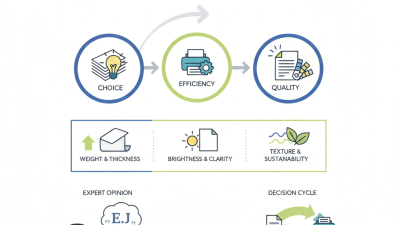
Paper weight quietly affects daily office work. For most routine documents, 80 g/m² is a practical office standard. It feeds smoothly through common printers and copiers. It also keeps mailing costs and storage demands reasonably low.

In my experience, 80 g/m² works well for invoices, internal notices, meeting notes, and draft reports. A typical sheet feels light but not fragile. Duplex printing usually remains comfortable, although dark images may show through. That assumption was too simple. Paper opacity also depends on brightness, fiber quality, and ink coverage. Test a few sheets before ordering large quantities.

Choose a heavier option when documents need a more substantial feel. Paper around 90–100 g/m² can reduce show-through and improve presentation quality. It may suit client proposals, training materials, or formal reports. However, heavier sheets can increase costs and sometimes cause feeding problems in older equipment. Check the printer’s recommended range. Also consider your office environment. Humid rooms may soften paper edges, while very dry rooms can increase static and misfeeds. Store unopened packs flat, away from moisture and direct heat. A small print test is worth the few minutes it takes.

Match Paper to Printer Limits: Check the Manufacturer’s Supported GSM Range

Before placing a bulk order, check the printer’s manual for its supported paper-weight range in GSM. GSM measures paper weight, but it does not tell the whole story. A thick sheet may also be stiff, textured, or coated, which can affect feeding. Check the tray and paper path, too. Some machines accept heavier stock through a manual feed slot but not through the main tray.

Test the exact paper you plan to buy. Load a small stack, select the closest media setting, and print several pages. Try duplex printing if your team uses it; heavier sheets may curl or jam when pulled through twice. Look for skewed text, feed errors, toner smudges, and sheets sticking together. A successful first page is not enough.

Keep the test notes. Record the paper weight, tray used, and printer settings, so a later reorder is easier to verify. If the paper falls near the manufacturer’s upper limit, test it in every printer model used in the office. It is tempting to assume one setting will work everywhere. That can be wrong. A little caution here may save a box of paper from becoming unusable.

Compare Whiteness and Show-Through Using ISO 2470 and ISO 2471

Choosing office paper requires more than checking its price or surface feel. In practice, two ISO measurements deserve close attention: ISO 2470 and ISO 2471. ISO 2470 measures diffuse blue reflectance, commonly reported as ISO brightness. A higher value usually gives text and graphics a cleaner, sharper appearance. However, excessive brightness can make screen glare uncomfortable under strong office lighting.

ISO 2471 measures opacity, which indicates how well paper blocks light. Higher opacity generally means less show-through when printing on both sides. This matters for invoices, reports, and training documents with dense text. Compare paper samples printed with your actual printer, toner, and typical font size. Laboratory figures are useful, but they cannot predict every workplace result. Humidity, ink coverage, and paper thickness can change the reading in daily use.

I once judged paper mainly by brightness. That was too simple. A bright sheet still looked weak when a dark page showed through from behind. Check seven details: ISO brightness, opacity, thickness, surface smoothness, printer compatibility, duplex performance, and cost per usable sheet. Hold printed pages near a window, then inspect them under normal desk lighting. Small differences become obvious there. Still, a perfect choice may not exist; improving opacity can sometimes increase weight and storage demands.

Verify Responsible Sourcing Through FSC Chain-of-Custody Certification

Choosing office paper responsibly requires more than checking weight, brightness, and price. A reliable paper choice should also show where its fiber came from. FSC Chain-of-Custody certification tracks certified material through forests, mills, distributors, and offices. It creates accountability across a complex supply chain.

Tip 1: Ask for the supplier’s current FSC certificate code. Verify it through the certification database, and check whether its scope includes paper products. A logo alone is not enough. The product claim should match the certificate details, such as FSC Mix or FSC Recycled. I have seen purchasing teams overlook this small step. It can create unnecessary uncertainty later.

Tip 2: Keep the invoice and product specification together. Record the paper grade, claim, certificate code, and purchase date. This simple file supports internal reviews and future supplier questions. Tip 3: Compare the claim with your actual use. A recycled-content option may suit routine drafts, while archival documents might require different performance standards. Do not assume certified paper always runs perfectly in every printer. Test a small box first, especially with high-speed equipment. Paper dust, curling, and jams can affect both productivity and employee experience. One detail is easy to miss: certification confirms responsible material tracking, not every environmental feature of the paper. Ask separate questions about recycled content, bleaching, packaging, and energy use. Reliable sourcing takes verification, not guesswork.

7 Tips for Choosing the Best Office Paper for Your Business - Verify Responsible Sourcing Through FSC Chain-of-Custody Certification

Tip Selection Dimension What to Check Practical Benchmark Why It Matters Suggested Evidence
1 Confirm the required paper size Match the paper size to printers, copiers, forms, and filing systems used in the office. Use one standard size for routine printing and stock other sizes only when business processes require them. Standardization reduces misfeeds, storage complexity, and unnecessary purchasing. Printer specifications, copier manuals, and internal document templates.
2 Choose suitable paper weight Review the paper weight, usually stated in grams per square metre (g/m²), and confirm equipment compatibility. Common office copy paper is often around 75–90 g/m²; heavier stock should be approved for the relevant printer or copier. Weight affects stiffness, two-sided printing performance, feeding reliability, postage, and storage costs. Product specification sheet and equipment paper-weight range.
3 Evaluate brightness and opacity Compare brightness, whiteness, and opacity claims using the supplier’s stated test methods and specifications. Select higher opacity for double-sided documents and internal reports where show-through could reduce readability. Appropriate opacity improves legibility and can support duplex printing, reducing paper consumption. Technical data sheet, sample prints, and a short office print trial.
4 Test runnability and finish Check paper curl, dust, moisture resistance, surface smoothness, and performance in the office’s main devices. Run a representative test covering single-sided, duplex, text-heavy, and graphics-heavy documents. Reliable feeding reduces paper jams, reprints, equipment downtime, and maintenance interruptions. Print-test results, jam frequency, user feedback, and printer maintenance records.
5 Verify responsible sourcing through FSC Chain of Custody Look for a valid FSC claim and confirm that the relevant supplier or product is covered by FSC Chain-of-Custody certification. Prefer clearly identified FSC 100%, FSC Recycled, or FSC Mix material according to the organization’s procurement policy. FSC Chain of Custody tracks certified material through the supply chain and helps substantiate responsible forest-product claims. FSC label or claim, certificate code, supplier certification record, and certification-status verification.
6 Compare recycled-content options Check whether the paper is made with recycled fibre, the stated recycled-content level, and whether it meets office performance requirements. Use recycled-content paper for suitable routine applications after confirming reliable feeding and print quality. Recycled fibre can support waste-reduction goals while maintaining normal office functionality when properly tested. Recycled-content declaration, environmental product information, and print-test results.
7 Assess total cost and packaging Compare cost per usable sheet, expected waste, delivery frequency, packaging materials, and storage requirements. Calculate total cost using purchase price plus estimated waste, reprints, jams, storage, and delivery handling. The lowest purchase price may not be the lowest operating cost if paper creates more waste or downtime. Purchase records, consumption data, waste logs, delivery terms, and packaging specifications.

Procurement note: FSC claims should be checked against current certification information and the exact product or supply-chain scope; certification status and acceptable claims can vary by supplier and product.