Top 10 Best Copy Paper Options for Quality Printing and Copying?
Copy paper is a fundamental component in any office setting. According to the U.S. Environmental Protection Agency, about 68 million trees are cut down annually for paper production. This highlights the importance of choosing environmentally friendly options. The right copy paper can enhance print quality and reduce waste.
In recent years, demand for high-quality printing materials has surged. A report from IBISWorld indicates that the copy paper market is expected to grow by 2.1% annually. This growth emphasizes the need for paper that combines quality, functionality, and sustainability. It's crucial to consider features like brightness, weight, and source when selecting copy paper.
Many buyers overlook these details. They often choose based solely on price, which can lead to subpar printing results. Poor-quality paper can cause jams, wasted resources, and frustration. Understanding the value of quality copy paper is key to efficient printing and copying in both personal and professional environments.
Understanding the Importance of Quality Copy Paper
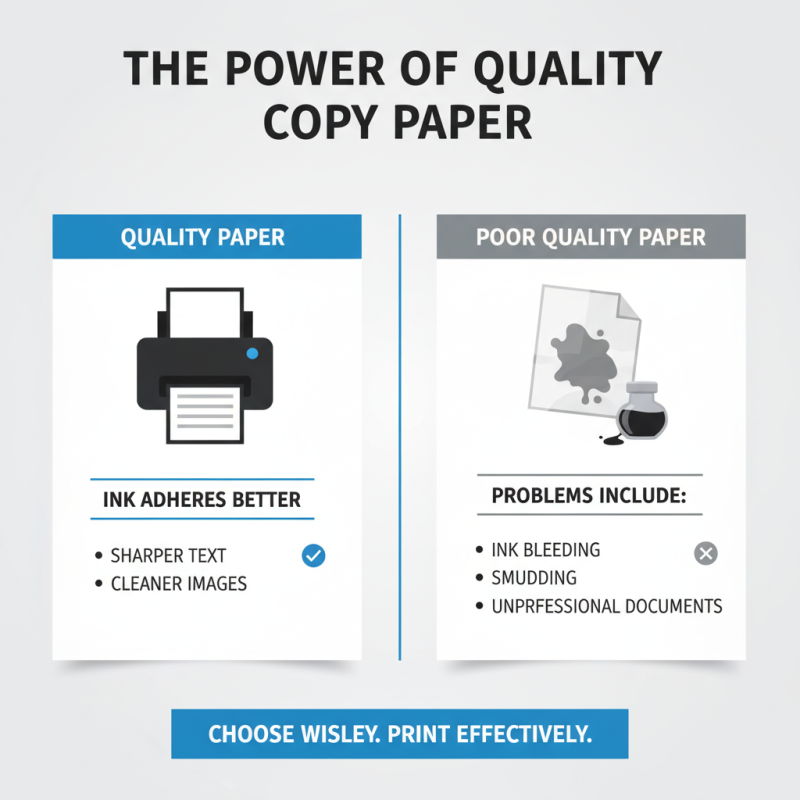
Quality copy paper plays a crucial role in effective printing and copying. When you use high-quality paper, the ink adheres better. This leads to sharper text and vibrant images. Conversely, poor quality paper may cause ink bleeding or smudging. These problems can ruin important documents and make them look unprofessional.
Choosing the right paper involves understanding its specifications. Look for brightness and weight as these factors affect the final print. High brightness levels usually lead to better contrast. In terms of weight, heavier paper often gives a more substantial feel. Reflecting on your needs is vital. Ask yourself what type of documents you frequently print. Not all jobs require the same level of quality.
While seeking high-quality options, keep in mind environmental factors. Some papers are manufactured using sustainable practices. Yet, not all marketed options live up to their claims. It is essential to research before making a purchase. Recognizing the importance of quality copy paper can enhance your printing experience significantly.
Key Features to Consider When Selecting Copy Paper
When selecting copy paper, consider weight and brightness. Standard copy paper usually weighs 20 lb, suitable for everyday use. Heavier paper, like 24 lb, provides a more professional feel. Brightness levels can affect print quality. A brightness rating of 92 or higher yields vibrant results.
Look at opacity, too. High-opacity paper prevents ink from showing through. This is crucial for double-sided printing. Texture matters, especially if you want sharp images or crisp text. A smooth finish works well for printing, while a heavier texture can enhance presentations.
Don’t overlook environmental impact. Recycled paper options are often of good quality. However, they may not perform as well in all printers. Testing different types can help find the right balance. Sometimes, what looks good on paper isn't practical in real use. Finding the ideal paper takes time and patience. Experimentation is key to achieving the best results.
Top 10 Recommended Copy Paper Brands for Printing
When selecting copy paper, several key factors arise. The grammage, typically between 70 to 100 g/m², directly impacts print quality. Studies show that paper density influences ink absorption and results in vibrant prints. Quality paper minimizes bleed and enhances text sharpness.
Reports indicate that about 45% of businesses experience print-related issues due to poor paper quality. The right choice can significantly reduce these problems. For instance, 90% of users noticed improved document presentations after switching to higher-grade paper. Choosing reliable brands ensures better performance and fewer paper jams.
Feedback from professionals highlights that consistency in quality is paramount. Paper that often tears or jams affects workflow efficiency. A thorough understanding of paper features can guide users. Opting for acid-free options can enhance document longevity. Though some brands excel, consumer satisfaction varies widely. It's essential to weigh personal needs against brand reputation.
Top 10 Best Copy Paper Options for Quality Printing and Copying
| Type |
Weight (GSM) |
Brightness |
Recycled Content |
Price per Ream |
| Multipurpose |
80 |
92 |
30% |
$5.99 |
| Presentation |
100 |
97 |
10% |
$8.49 |
| Inkjet |
90 |
95 |
0% |
$6.99 |
| Photo Paper |
210 |
100 |
0% |
$12.99 |
| Card Stock |
250 |
92 |
0% |
$14.99 |
| Resume Paper |
90 |
96 |
20% |
$9.99 |
| Thermal Paper |
80 |
85 |
0% |
$7.49 |
| Legal Size |
80 |
92 |
40% |
$5.50 |
| Colored Paper |
75 |
90 |
50% |
$6.00 |
| Opaque Paper |
80 |
94 |
0% |
$6.75 |
Comparing Pricing and Performance of Different Copy Paper Types
When selecting copy paper, pricing and performance are crucial. Different types offer
various benefits and limitations. For instance, standard copy paper tends to be
cost-effective, making it ideal for everyday tasks. However, its performance can vary based on paper weight. Heavier papers, though pricier, provide superior print quality.
Consider the brightness levels too. A higher brightness rating results
in sharper images and text. This can enhance clarity but often comes with a higher price tag. A balance must be struck.
Economical choices may not always meet professional standards.
Many users overlook the environmental impact of paper types. Recycled options
might cost more upfront but can lead to long-term savings and sustainability benefits. Evaluating your printing needs is essential.
It might warrant investing in specialized paper for specific projects. Ultimately, understanding these factors enables better
decision-making in paper selection.
Tips for Proper Storage and Handling of Copy Paper
Proper storage and handling of copy paper are essential for maintaining its quality. Humidity and temperature fluctuations can cause paper to warp and jam printers. According to industry reports, the ideal temperature is between 68°F and 72°F with humidity levels around 50%. Maintaining these conditions extends the paper’s lifespan.
When storing copy paper, keep it in its original packaging. This protects it from dust and moisture. Avoid placing heavy items on top of the paper to prevent bending or crushing. Experts suggest storing paper in a flat, dry area. Surfaces that are damp or near heat sources can deteriorate the paper quality.
It’s crucial to handle the paper carefully. Always use clean hands or wear gloves when touching the edges. Oils from your skin can transfer to the paper, leading to printing issues. If you notice any wrinkles or creases, discard those sheets. Even slight imperfections can affect copying and printing accuracy. Investing time in proper storage and handling can yield better printing results.